
Our Promise to You: Fast, Reliable, Friendly Support
At Exigent, our clients are never just a number in a queue. Our commitment to customer services lies at the root of everything we do. Plus, with a team whose tenure averages 10 or more years, we offer continuity that supports deep partnerships with our clients.
When you need our services, we offer several options:
Through our support portal
The best option for requesting support is through the Service Portal. Once logged into the portal, you can see the status of tickets, open a ticket and add notes, see resolution details, print the ticket, and more.
Email [email protected]

The second option is to email [email protected] to create a service request ticket. Once we receive your ticket, you will get updates via email and can also track your request's progress in the service portal. Include your name, company name, phone number, and as much detail about the issue as you can, including screenshots.
Use the Exigent app in Teams
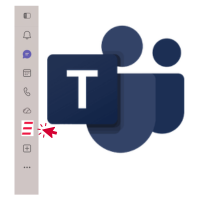
Our newest path to reach support is just a click away. If your organization uses Microsoft Teams, you can now select the Exigent IT Support app icon in the Teams left-side menu and use AI-assisted chat to create a ticket, troubleshoot your issue while you wait, and connect with an Exigent engineer quickly.
Call (973) 770-0500, option 3
While tracking and visibility are best through the portal, if you need assistance after-hours or urgently, call Exigent is the best option. Dial (973) 770-0500, and choose Option 3 for technical support. Your call will be placed in a queue and answered by a dispatcher who will evaluate and route your call.
NEW! The "E" logo system tray request
 Use the "E" logo icon in your system tray to start a ticket request with a few clicks of your mouse. On PCs, the system tray is located on the bottom of your screen with the "^" icon found on the far right of that menu. For Mac users, you will find the equivalent on the left side of your menu bar at the top of your screen.
After clicking on the icon, you have the option to create an "Exigent help request form." Complete that form and submit to instantly submit a ticket.
Understanding Service Ticket Response Time
No matter how submitted, all tickets funnel into a queue to be evaluated by severity and business impact before being assigned a priority. Once priority is determined, our team will communicate what to expect next.
Severity & Business Impact 
Determining Ticket Priority

What to Expect
During Business Hours
Once your service request ticket has been submitted, a dispatcher will acknowledge within 30 minutes.

During Extended Hours
Once your service request ticket has been submitted, immediate acknowledgment.

Holidays & After-Hours Procedures
While our offices are closed on a few special days throughout the year, don't you worry—we've got your back.
While our offices are technically closed, we're just a message away. Our holiday support process is exactly the same as after-hours support, with our team on-call and ready to help.


Please click!
Feedback from our customers is an important way for us to gauge the success of our service team. After every interaction with our Service Team, you'll receive a final email that includes a customer satisfaction survey. One quick click to rate your service experience is all we ask.
Need additional assistance?
We are committed to delivering an exceptional customer experience, so please let us know how we can help you.
- Contact the Service Team at [email protected]
- Escalate an issue to [email protected]
- Reach out to Customer Care at [email protected]
- You can always reach us via phone by calling (877) 394-4368.
Don’t forget you can now reach Exigent Support via our Microsoft Teams app! (Look for the “E” in your left-side menu in Teams)
Download the guide

Exigent IT Support FAQ
How do I submit an IT support request to Exigent?
What types of technology issues can Exigent help resolve?
How quickly does Exigent respond to support requests?
What should I do if I have an urgent IT or cybersecurity issue?
Does Exigent provide after-hours IT support?
How does Exigent prioritize support tickets?
Can Exigent support businesses with internal IT teams?
What information should I include when opening a support request?
How can I track the status of my support requests?
What makes Exigent's support approach different from other managed service providers?
Why does Exigent use artificial intelligence and automation?
How is AI used at Exigent?
